Phase 1: The New Era of Web Creation
Before you start building, it is important to understand how the landscape has shifted. The "how" of building a website depends entirely on your goals and the tools you choose.
What is Vibe Coding?
Andrej Karpathy used the term "vibe coding" in February 2025. In this workflow, a person describes the desired result, reviews what an AI tool produces, and guides further changes. The generated site still needs testing before publication.
A useful prompt describes who the page serves, the action visitors should take, and the constraints. For example: “Add a contact form with name, email, and a clear success message.” Review the generated code or behavior, then test that submissions actually arrive.
The Three Main Paths to Building
To build a website today, you generally choose one of these three paths:
- The Vibe Coding Path (Best for Innovation): You use AI tools like Bolt, Lovable, or Cursor. This is perfect if you want a unique startup idea, a web tool, or a highly specific design without hiring a developer.
- The Website Builder Path (Best for Simplicity): You use platforms like Wix or Squarespace. These are "drag-and-drop" tools. They are easy to use for beginners but can be hard to move away from later.
- The WordPress Path (Best for Content): You use a Content Management System (CMS). This powers over 40% of the web. It is great for big blogs or news sites but requires more maintenance.
Phase 2: Planning Your Digital Architecture
A common mistake beginners make is skipping the planning phase. They jump straight into picking colors. This leads to messy sites that confuse visitors. Before you open any tool, you need a map.
Define Your Goal
Ask yourself: What is this site actually for?
- To Sell: You need an E-commerce setup with a secure checkout and product pages.
- To Impress: You need a Portfolio with high-quality image galleries and large visuals.
- To Inform: You need a Blog with a clean reading layout and newsletter integration.
Know Your Audience
Who are you building for? A website for a law firm needs a serious, trustworthy vibe. A website for a video game needs a dark, energetic vibe. Understanding this helps you write better prompts for the AI later.
Map the Sitemap
Create a simple list of the pages you need. For most websites, this includes:
- Home: The main hook that explains what you do.
- About: Your story and team.
- Services/Products: What you offer to the customer.
- Contact: A form or email address to reach you.
Phase 3: The Best Tools to build a website
If you choose the modern vibe coding route, you need the right software. The market is flooded with new AI agents, and finding the one that matches your specific needs can be overwhelming.
Where to Find the Best Vibe Coding Tools
This is where a dedicated navigator becomes essential to save you time.
Use our tool comparison to separate hosted builders from coding agents, then choose two candidates for a small trial. Check each provider's documentation and run the same page-and-form task in both. The second edit and publishing workflow often reveal more than the first screenshot.
Popular Vibe Coding Engines
Once you have explored the navigator, you will likely encounter these top engines:
- Bolt.new: This tool is incredible for building full-stack web applications directly in your browser. It allows you to deploy to the web in one click.
- Lovable: This platform positions itself as an "AI software engineer." It is excellent for turning visual ideas into real, working code.
- Cursor: This is a code editor for people who want to vibe code but still want to see the files. It predicts what you want to type next, speeding up the process massively.
Phase 4: Step-by-Step Guide to Building a Website
Let's look at how to build a website using a vibe coding workflow. This is the modern way to get things done fast.
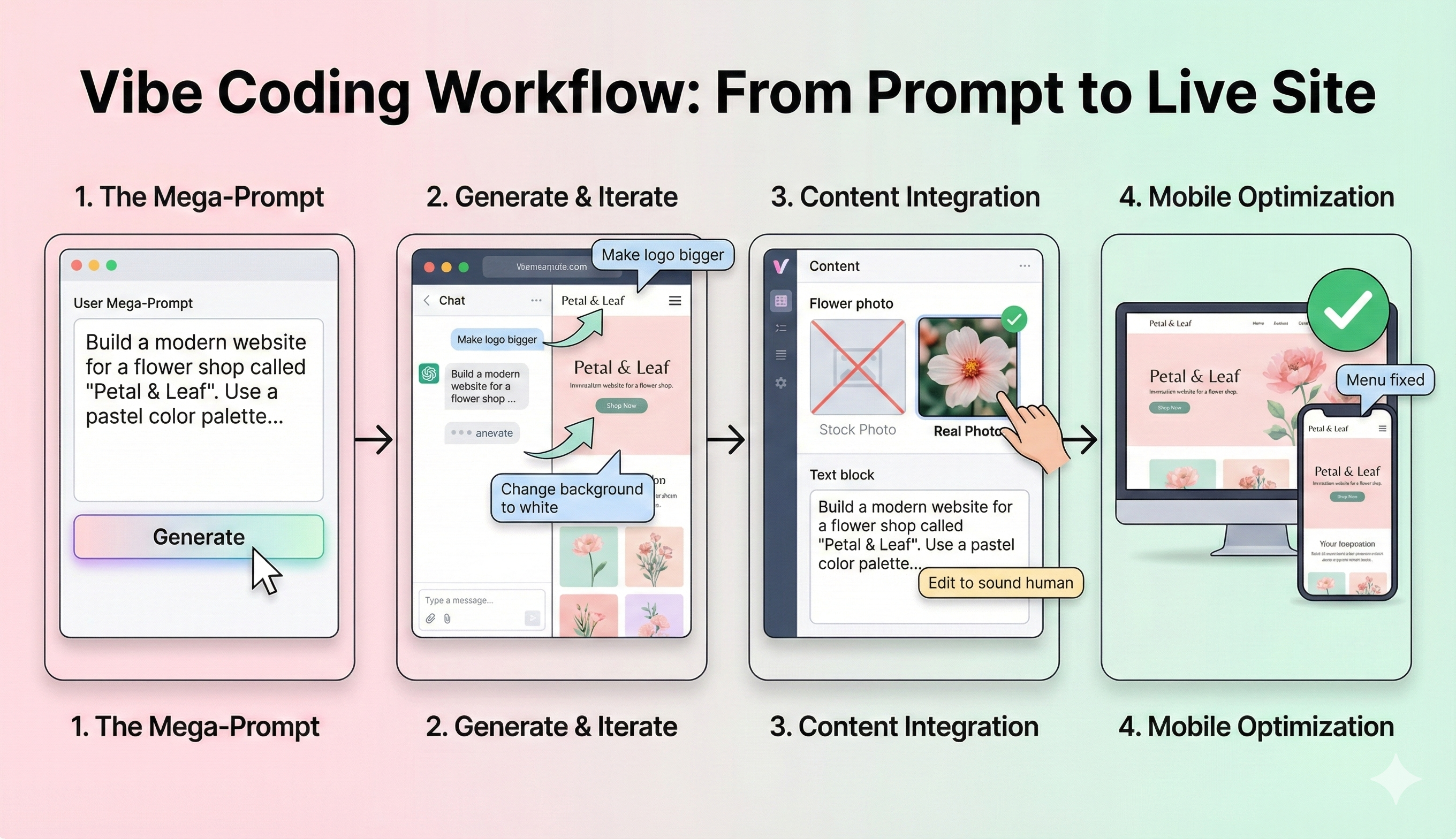
Step 1: The "Mega-Prompt"
Start by writing a detailed description of your website. Do not be vague. The AI needs specific instructions to give you a good result.
Bad Prompt: "Make a flower shop site."
Good Prompt: "Build a modern website for a flower shop called 'Petal & Leaf'. Use a pastel color palette with soft pinks and greens. The homepage should have a large hero image, a section for 'Best Sellers', and a newsletter signup form. The font should be elegant and readable."
Step 2: Generate and Iterate
Paste your brief into a tool such as Bolt or Lovable and inspect the first result. Generation time varies with the request and product. Check the layout, links, form behavior, and content before asking for a specific revision.
- Iterate Visuals: "Make the logo bigger." "Change the background to white." "Add a shadow to the buttons."
- Iterate Function: "Make the 'Buy' button open a contact form." "Add a Google Map to the footer."
This conversation is the core of vibe coding. You are shaping the product through continuous feedback.
Step 3: Content Integration
You need text and images to fill the pages.
- Text: You can ask the AI to draft your 'About Us' page. Just make sure to edit it so it sounds like a human wrote it, not a robot.
- Images: Avoid generic stock photos if possible. Real photos build more trust. If you lack photos, use AI image generators to create specific assets that match your brand's color scheme.
Step 4: Mobile Optimization
Check the site on a real phone as well as a desktop browser. Test navigation, forms, text size and any checkout flow at narrow widths. A responsive preview is useful, but it does not prove every interaction works. If the layout breaks, give the AI a specific request such as "Fix the mobile menu layout," then test the change again.
Phase 5: Technical Essentials (Domain and Hosting)
Your website needs a home on the internet. Even with AI, you still need a digital address and a place to store your files.
Choosing a Domain Name
Your domain is your address (like google.com). It is the first thing people see.
- Keep it short: Long names are hard to type and easy to misspell.
- Make it easy to say: Avoid hyphens and numbers. They cause confusion when you tell someone your website name out loud.
- Choose a suitable extension: Pick a domain ending your audience will recognize, and check its registration and renewal cost before buying.
Web Hosting
Hosting is the service that keeps your website online.
- If you use a Builder: Hosting is usually included in your monthly subscription fee (e.g., Wix or Squarespace).
- If you Vibe Code: Tools like Bolt often allow you to deploy to Netlify or Vercel. These are high-performance cloud hosts that often have free tiers.
- If you use WordPress: You will need a host like Hostinger or Bluehost. Managed WordPress hosting is best because they handle security updates and backups for you.
Phase 6: Design Principles for Non-Designers
You don't need a degree in art to make a site look good. You just need to follow a few simple rules.
Use Whitespace
Do not clutter the screen. Space makes your content look elegant and professional. It makes the text easier to read.
Visual Hierarchy
Guide the visitor's eye. The most important elements should be the biggest.
- H1 Tags: Your main headline should be large and bold.
- Buttons: Your "Call to Action" (like 'Buy Now') should be a bright, contrasting color so it stands out.
Accessibility
The web must be inclusive for everyone.
- Contrast: Ensure your text stands out clearly against the background. Grey text on a white background is hard to read.
- Alt Text: Add descriptions to your images. This helps people who use screen readers to understand what is on the page.
Phase 7: SEO (Getting Found on Google)
You want people to find your website. This is where Search Engine Optimization (SEO) comes in.
Keywords
Use the words your audience uses in a descriptive title, main heading, and relevant body text. Google recommends helpful content and clear wording, rather than repeating a phrase to satisfy a fixed count. See Google Search Essentials.
Meta Tags
These are the invisible labels that tell Google what your page is about.
- Page title: Write a concise, specific title that matches the page. Search engines may choose a different title link for some queries.
- Meta description: Summarize the page for a potential visitor. Search engines may instead show a relevant excerpt from the page.
Site Speed
A fast, usable page helps visitors. Check image sizes, layout shifts, and mobile performance on the published site. Generated code is not automatically fast or clean; measure the result instead of assuming.
Phase 8: Common Mistakes to Avoid When Building a Website
The path to a successful website is filled with pitfalls. Avoiding these common errors will save you time and money.
- Over-Complication: Do not add a forum, a shop, and a blog all at once. Start with a simple version of your site and grow it later.
- Ignoring measurement: Set up an appropriate analytics tool and Google Search Console so you can see visits, search queries, and indexing issues.
- Broken links: Test navigation and calls to action before launch. A link that goes nowhere stops visitors from completing a task.
- No Contact Info: Make it very easy for people to find your email or phone number. If they have to hunt for it, they will leave.
Conclusion
A clear goal and a small, testable first version make website building manageable. Choose the workflow that fits the site: a conventional builder for standard publishing, or an AI-assisted development tool when you need a custom interaction.
Before launch, verify the published pages, forms, mobile layout, and access to your code or content. Then use Search Console to learn how people actually find the site. If you are still choosing a tool, compare our vibe coding options or open the tool finder.


